Make the upload-submit distinction clear
Help users understand the difference between adding files and sending them
Uploading a file isn’t always the final step, but it can seem that way. If it’s not clear when files are “added” versus when they’re “sent”, people might think they’ve finished when there’s still more to do or believe they’re submitting files when they’re only halfway through.
We may not see this in every service, but it’s a risk worth designing against. Confusion between uploading and submitting can lead to incomplete applications, missing evidence, and unnecessary follow-up calls, all of which can be avoided with a clearer indication of steps.
This design consideration is about making those steps explicit and intentional. Showing users where they are in the journey, what action they’re taking, and what happens next, whether that’s adding files, reviewing them, or submitting them.
The challenge
In some services, uploading a file can look and feel like completing the task, which can lead users to leave before taking the actual “send” step, resulting in incomplete submissions, missing evidence, and extra follow-up work. Without a clear distinction between adding files and submitting them, users can feel uncertain about what has been received and may re-upload unnecessarily or abandon the task.
What we’re exploring
Hypothesis: Explicit confirmation of each action will help users understand what stage they are at
Based on our understanding, users can be unsure what the system has done after they take an action. We believe this is because this is because confirmation messages aren’t always clear or separated between upload and submission. So if we give distinct confirmation for both successful uploads and successful submissions… We'll see more users moving forward knowing exactly what’s been completed, without duplication or doubt.
Together, these hypotheses focus on clarity at both ends of the interaction: before the action, through clear language and expectations, and after, through distinct and timely feedback. Both are about reducing uncertainty, helping users feel confident about what’s happened and what’s to come.
Here’s how this might look in practice. Rather than changing how the upload component works, this approach focuses on using clear, staged language and feedback to help users see what’s been added, what’s still to come, and when their files have actually been sent. It makes each stage feel clear and intentional, both visually and linguistically. Users can tell when they’ve added their files, when they’ll get a chance to review them, and when everything’s finally been sent.
The aim is to create a calm, predictable rhythm through the journey – Add → Review → Send → Confirm – one that mirrors the user’s mental model and builds confidence without adding complexity.
Hypothesis: Giving people a final check before they commit will reduce incomplete submissions
Based on our understanding, users feel more confident when they can review what they’re about to send. We believe this is because seeing all uploaded files together allows them to identify missing or incorrect documents. So if we include a clear review stage before final submission, making use of established approaches like the Check answers pattern… We'll see more accurate submissions with fewer missing files, allowing users to complete the task without needing to redo it.
Many services include a “Check your answers” step before users submit their information. It’s a familiar and trusted pattern, but the way uploads are displayed at this stage varies. A standard format for how uploaded files appear on the Check your answers page could be helpful.
The pattern already gives space for users to go back and change things. In the context of uploads, “change” doesn’t quite describe what the user is doing; they’re swapping one document for another or removing it altogether, so the wording should match the action.
Using wording like “replace” or “remove” instead of “change” fits naturally with that idea. Uploads are a slightly different case to most other answers; they’re not single bits of data but lists of documents, so this feels like an extension of the pattern, not an alternative to it.
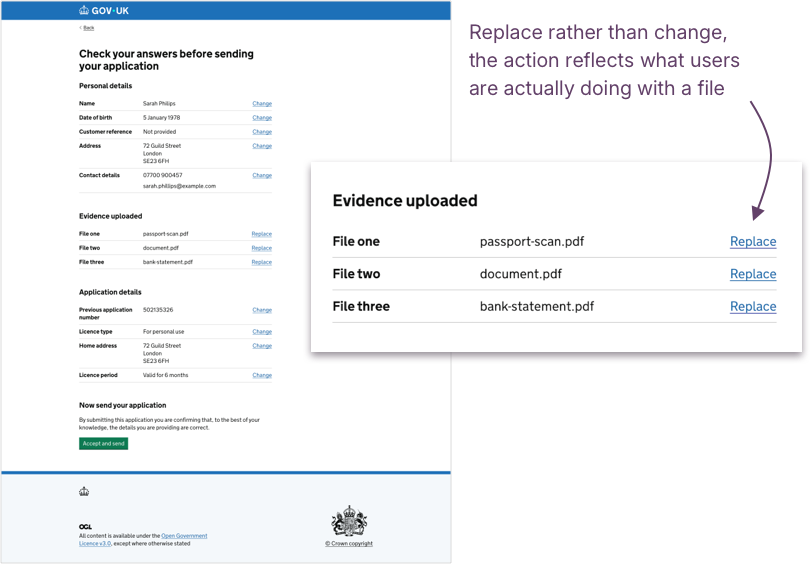
At this point, uploads are complete, so the list doesn’t need to repeat everything shown during upload. Details like file size or progress were useful while the action was happening, but add little value now. What’s most helpful is a clear list that lets users recognise what’s included, typically just the file names with links to replace or remove each item.
When uploads span multiple sessions, showing when each file was added could also reassure users that everything’s still there and up to date. Otherwise, that extra detail may not be needed.
When an upload triggers a system action
In some services designed for agents rather than members of the public, uploading a file isn’t just about adding it; it’s what enables the next step. The file is sent straight to the system for processing or summarisation before the user can continue.
Here, upload effectively means “submit for processing”. It’s not about sending evidence but triggering an action that keeps the journey moving. Clarity is still essential, but what users need isn’t control; it’s understanding.
Hypothesis: Explaining when files will be processed immediately helps users understand what's happening
Based on our understanding, some services need to process files immediately after they’re uploaded so users can continue their journey. We believe this is because the upload step triggers a system action, for example, extracting or summarising information, but this behaviour isn’t always made clear before the upload happens. So if we explain that uploading will automatically send the file for processing, and make that action visible through clear feedback or progress messaging… We'll see users understand what’s happening and why, and feel more confident to continue while the system does its work.
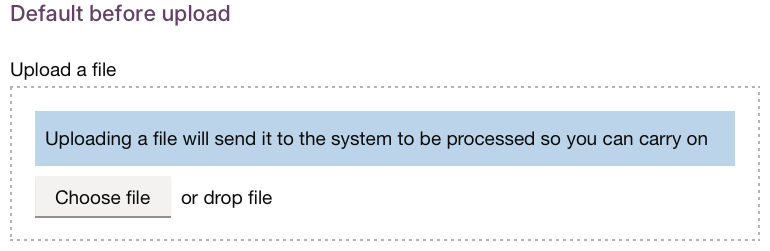
One option could be to explain this behaviour directly on the upload page, for example, by adding a short line beneath the button: “Uploading a file will send it to the system to be processed so you can carry on.”
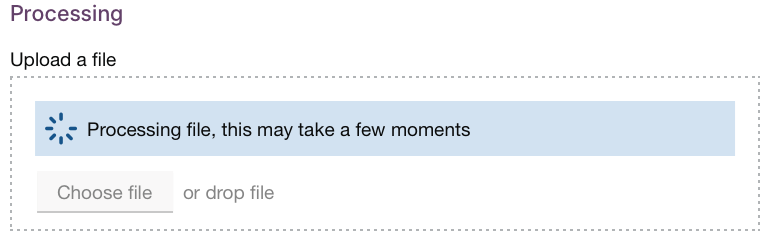
If processing takes a little while, showing a simple message such as “Processing file – this may take a few moments” could help reassure users that the system’s working, even when they can’t see what’s happening behind the scenes.
Get support
Need help implementing this in a prototype or production build? Get support from the Design System team.
Give feedback
We depend on insights from real projects to update and improve the design system. If you use something we made, tell us how it went.
Could we improve this page?
Send questions, comments or suggestions to the DWP Design System team.
Last updated: