Set clear expectations early
Tell users exactly what to expect, in plain language, before they start
We have seen examples where vital information about file types, sizes or limits gets buried: tucked into a details component, hidden in hint text, or wrapped up in technical language that not everyone understands.
Just having the information isn’t enough. It needs to be clear, timely, and easy to act on, especially when users are under pressure or unsure about what’s being asked.
Surfacing expectations early, right where users are focused, can help them to prepare properly and use the upload service with confidence.
The challenge
Users can struggle to upload files successfully not because guidance is missing, but because it’s hard to find, too technical, or appears too late in the journey. This creates confusion and errors, especially for users under pressure.
What we’re exploring
For task-focused users, whether they are members of the public or experienced users of an internal system, key information needs to appear close to the upload component, not scattered across the page. We’ve seen rules placed above or below the component, but because users’ attention is fixed on the upload control, that guidance is easy to miss.
There are two things people need to understand:
- Understanding what’s allowed: making file types and formats obvious from the start.
- Understanding limits: making size and number constraints visible and easy to act on.
Understanding what’s allowed
Hypothesis: Listing accepted file formats will make uploading easier
Based on our understanding, users can get stuck or frustrated when attempting to upload unsupported file formats. We believe this is because formats such as PDF, DOC, XLS, JPEG, and PNG aren’t always clearly communicated before uploading. So if we list which file formats are accepted, in plain language, early in the journey… We'll see more users choosing the correct format first time, reducing delays and the need for conversion tools.
Hypothesis: Explaining what file formats mean and helping to convert them will reduce failed uploads
Based on our understanding, some users aren’t familiar with file formats or how to convert them. We believe this is because services often assume a level of digital confidence that not everyone has. So if we explain what file formats are, in plain language, and offer help with converting them when needed… We'll see fewer failed uploads, lower anxiety, and better inclusion for users with lower digital skills or limited access to the right tools.
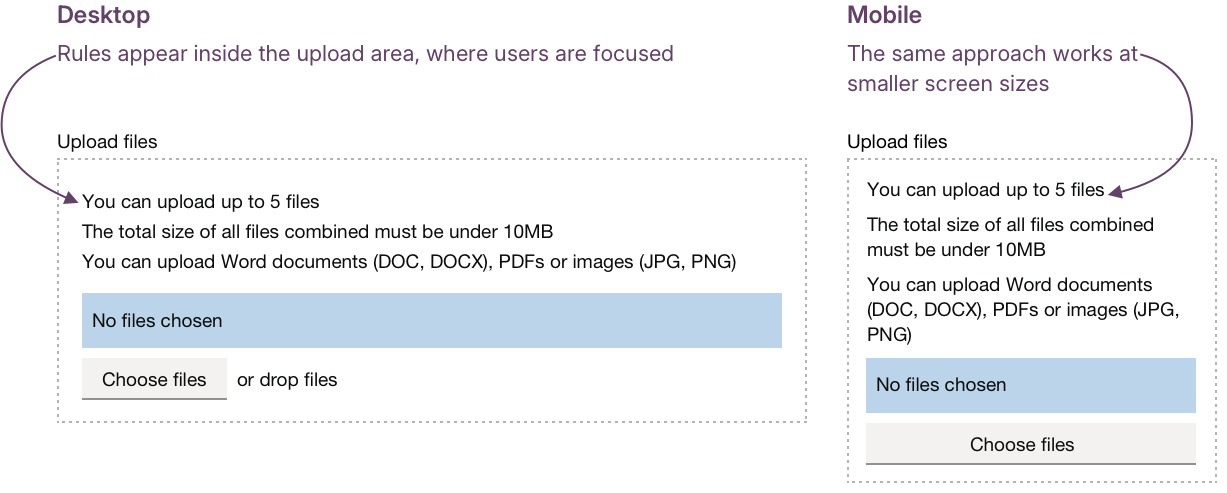
One possibility: embed rules information in the upload area
One approach could be to place information about restrictions on file types, formats, size and number directly inside the upload area where files can be dropped. This puts the information as near as possible to the point of action, and also works at smaller screen sizes.
Understanding limits
These hypotheses look at how we can make file size and number limits clearer and easier to act on.
Hypothesis: If we tell users about file size limits they will adjust their files before uploading
Based on our understanding, users can feel blocked or frustrated when their file is rejected for being too large or too small. We believe this is because file size limits aren’t always made clear until after an upload fails. So if we tell users the file size limits at the start of the upload process… We'll see users adjusting their files before upload, avoiding wasted effort and reducing errors.
Hypothesis: If we tell users how many files are allowed before they start, they will be better able to complete the task in one go
Based on our understanding, users may feel uncertain or frustrated when they are unsure of the file upload limit. We believe this is because services don’t always clearly state limits or expectations upfront. So if we tell users how many files they can upload before they begin… We'll see more users able to complete the task first time.
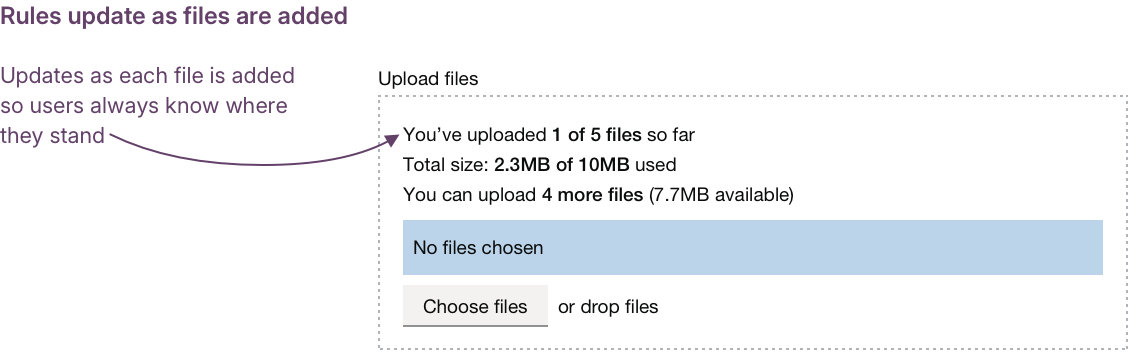
As we see when designing data interfaces, users can struggle when limits are hidden, abstract, or only become obvious after something fails. You might see “Max 10MB” or “Up to 5 files”, but they don’t tell you how far you’ve got. One improvement could be to update this information dynamically so progress is played back as it happens, for example:
- “Total size so far: 1.8MB of 10MB used.”
- “1 of 5 files uploaded.”
Edge cases and barriers
Not all problems are about what’s allowed or how limits are shown. Sometimes users are blocked by rules that don’t need to be there at all. File name restrictions are a good example of this.
When technical constraints rather than user needs dictate what’s possible, pressure shifts back onto users; they end up having to rename or reformat files just to get through the task.
This runs counter to several Government Design Principles: starting with user needs, doing the hard work to make it simple, and designing for everyone.
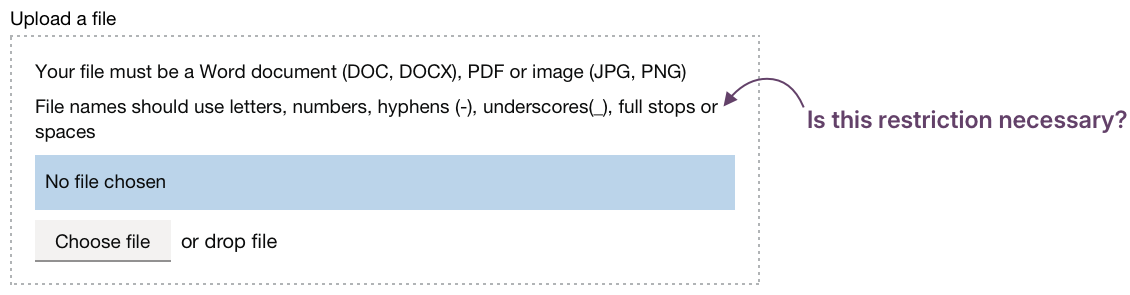
If a constraint genuinely needs to exist, it should be explained clearly and early. But if it’s simply a limitation inherited from a system or tool, that’s design debt worth challenging.
Hypothesis: Avoid unnecessary file name restrictions
Based on our understanding, users can become frustrated when uploads fail due to hidden naming rules. We believe this is because services enforce restrictions without explanation or an apparent reason. So if we avoid adding file naming limits by default, and explain them clearly when they are unavoidable… We'll see fewer failed uploads, less wasted effort, and more users able to complete the task without unnecessary edits.
Could we improve this page?
Send questions, comments or suggestions to the DWP Design System team.
Last updated: